
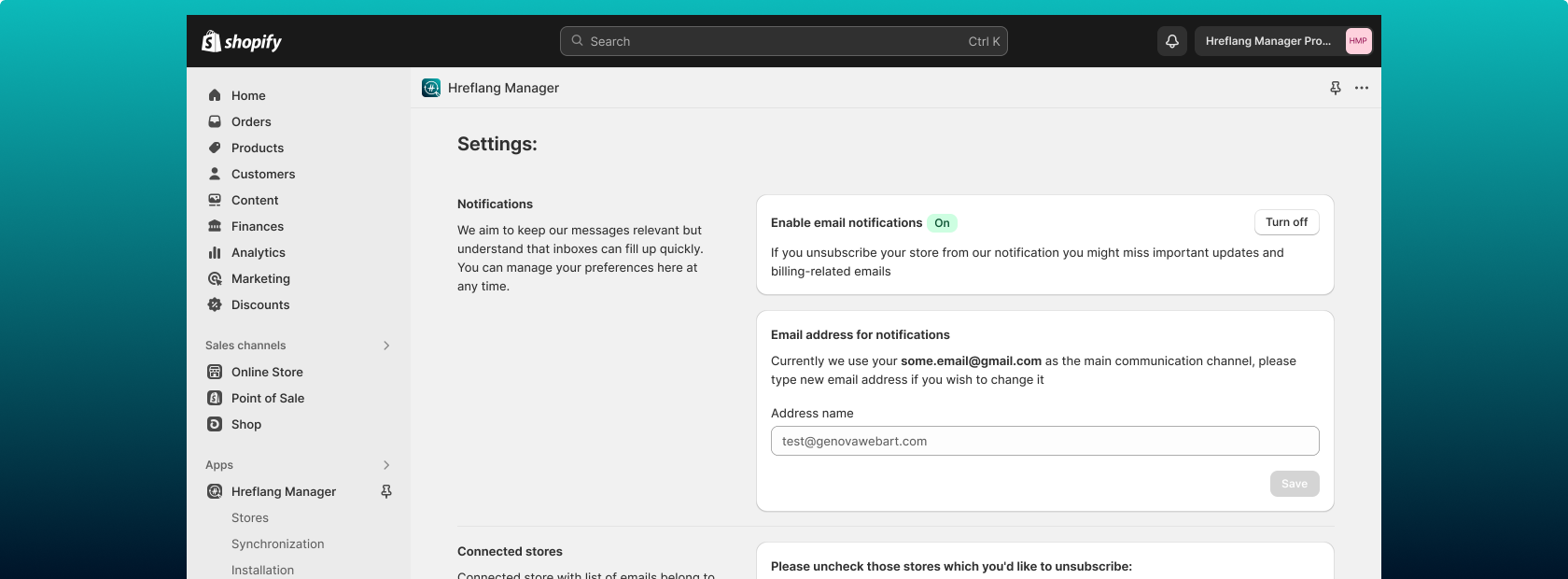
Settings page
In the app Settings, you can:
- Set up regular notifications about stores and sync results.
- Configure the option of blocking the hreflang tags from the Shopify Markets.
- Manage the auto-sync with Shopify Markets updates.
- Review the synchronization progress across your stores.
- Setting your product mapping rules.
- Specify alternative and custom x-default tags.
The page is divided into four tabs, so it’s easy to navigate intuitively and quickly locate the necessary settings.
Note:
In Single-store mode, several multi-store-specific settings are hidden because they manage behavior across multiple stores and do not apply to a single-store setup.
General
Shopify Markets' Hreflang tags Settings
If you have Shopify Markets configured, it automatically generates its own hreflang tags and adds them to your store’s code. However, these Shopify Markets’ hreflang tags do not handle cross-store matching between equivalent pages, products, or collections. To ensure accurate linking and proper SEO across multiple stores, you are using the Hreflang Manager app.
The app generates its own hreflang tags that cover all necessary page matches and, by default, blocks the Shopify Markets’ tags to avoid conflicts.
If you have contacted Shopify Support and had the Markets’ tags removed from your store’s code, you should enable the corresponding setting in our app. This will prevent the app from injecting the blocking snippet, as the Shopify Markets’ tags are no longer present.
Summary:
- If Shopify Markets’ tags are still present in your code:
Keep the Shopify Markets Hreflang Tags setting turned off. - If Shopify Markets’ tags have been removed with the help of Shopify Support:
Turn the Shopify Markets Hreflang Tags setting on in the app.

Self-referencing Hreflang tags
Note:
This function is turned ON by default. If you don’t require it for your store, make sure to turn it OFF.
This setting adds an hreflang tag that points to the same page it’s placed on. For example, if your English page is https://example.com/en, the app will add this tag:
<link rel="alternate" hreflang="en" href="https://example.com/en" />
Search engines such as Google recommend including self-referencing hreflang tags. They help search engines clearly understand that the current page is also part of the set of localized versions. Without them, the hreflang cluster may be considered incomplete, which could affect how correctly your localized pages are indexed and displayed in regional search results.
When to utilize: You should enable this option if some of your pages don’t have matching versions in other languages or stores.
For example, if you have a blog article that only exists on your English-language store, the self-referencing tag ensures it’s still properly recognized and indexed. It’s also helpful if you want to follow Google’s best practices for all pages, even when there are no alternatives.

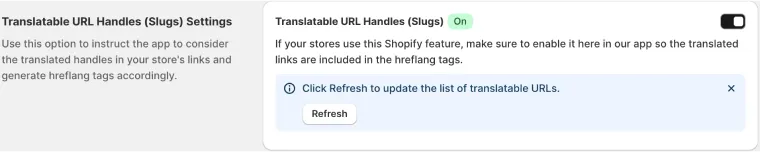
Translatable URL Handles (Slugs) Settings
Note:
This function is turned ON by default. If you don’t require it for your store, make sure to turn it OFF.
The Translatable URL Handles setting controls how the app matches and connects equivalent pages across languages. By default, Hreflang Manager identifies language versions based on the same URL handle (slug) across different stores or markets. However, in some cases, translated pages may use different slugs. For example:
- English version:
https://example.com/en/products/ coffee-mug - French version:
https://example.com/fr/produits/ tasse-a-cafe
In this case, the handle coffee-mug differs from tasse-a-cafe. Without translation support, the app may not recognize these two URLs as equivalents, and the hreflang tags would not be generated correctly.
By enabling the Translatable URL Handles setting, you can specify or synchronize the translated slugs between versions so the app can correctly match and generate hreflang tags linking all localized versions.
Use this option when: Your store’s localized versions have unique, translated URL handles.
No need to use this option when: Your URLs use identical handles across languages, or the setup of the handles translation is not finalized or may be incorrect.
Enabling it ensures proper hreflang relationships when your store structure is fully localized, improving the accuracy of hreflang mapping and search engine recognition of equivalent content across markets.
Synchronization
Sync Overview Table
The Sync Overview Table is a summary dashboard that shows the synchronization status between your connected stores in the Hreflang Manager app. It helps you track how many items are fully matched or partially matched across each store, compared to how many items you have in total.
Each tab represents a specific content type: Products, Collections, Pages, Blogs, Blog Tags, and Articles. The table lists the total number of items for each store and shows how many of them are fully synchronized with their equivalents in other stores.
- Full Match means that the item has a matching counterpart in each of the connected stores.
- Partial Match indicates that the app found a matching item in a few stores, but not in all of the connected.
Use this table to quickly check the synchronization progress and identify where hreflang connections are complete or still need review. For manual edits or corrections, go to the Synchronization tab, where you can adjust individual matches.

Automatic Synchronization with Shopify Markets
Note:
This function is turned ON by default. We don’t recommend disabling it, although you always have the option to turn it off.
When you use Shopify Markets, your store structure may change over time. For example, when you add new markets, remove existing ones, or update domains. Enabling Automatic Synchronization with Shopify Markets ensures that the Hreflang Manager app automatically updates all hreflang tags to reflect these changes.
This means you don’t have to manually adjust hreflang tags every time your market settings are updated in Shopify. The app will detect these changes and keep your hreflang setup accurate across all connected stores.
Use this feature if your stores frequently change markets or you want to ensure hreflang tags always stay in sync with Shopify’s market settings. Disable it only if you manage hreflang relationships manually or want full control over updates. In case of disabling, the stores will no longer receive automatic updates and will require manual adjustments after any market changes.

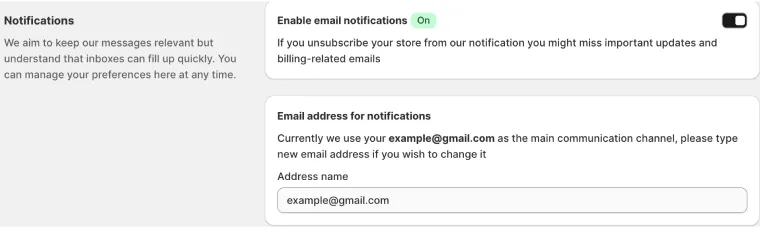
Notifications
Note:
This function is turned ON by default. If you don’t require it for your store, make sure to turn it OFF.
In the Notification tab, the “Enable email notifications” setting allows the app to send you emails about billing and other important store-related events. Keeping this setting turned on ensures you don’t miss critical information.
The “Email address for notifications” setting specifies where these emails will be sent. By default, the app uses the store’s email, but you can enter a different address if you prefer another account to receive these notifications, for example, a team member responsible for store management or billing.
Please note that if you reach your plan limits, you will receive an email reminder to upgrade your plan, regardless of your notification settings.
Advanced
Alternative X-default & Custom X-default Settings
The X-default tag is a special hreflang attribute that tells search engines which page should be shown to users when their language or region does not match any of your localized versions. It acts as a fallback option for visitors from unspecified or unsupported locations.
In case the basic X-default setup on the Stores page doesn’t work for you, you can turn on this advanced option and choose how the X-default tag is assigned:
- Alternative X-default. Read more about it here.
- Custom X-default. Read more about it here.

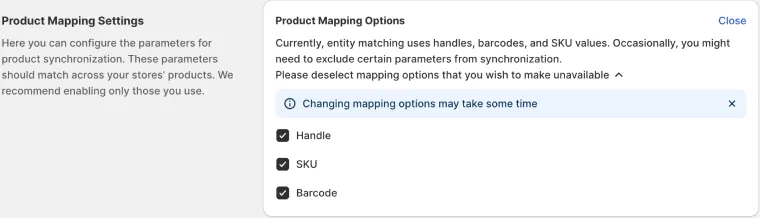
Product Mapping Settings
The Product Mapping Settings control how the Hreflang Manager app identifies and links equivalent products across your connected stores. Accurate mapping is essential for generating correct hreflang tags between product pages.
Hreflang Manager offers several matching options:
- By Handle: matches products with the same handle (slug) across stores.
- By SKU: matches products using their unique SKU code.
- By Barcode: matches products using their barcode identifier.
By default, during the Installation process, we offer to allow all the mapping keys above, so the synchronization process goes as fast and smoothly as possible. Even if most of your products are being tracked by barcode or SKU, it may still be useful to have a handle as a backup for some specific cases.
However, you can select the method that best fits how your product data is structured. Also, if during the installation of the application you’ve chosen mapping keys that you’d like to change now, you can do that anytime in this tab.

FAQ about Settings page:
Should I enable the “Shopify Markets Hreflang Tags” setting?
It depends on whether Shopify Markets’ own hreflang tags are still present in your store code.
- If Shopify Markets’ tags are still in your store: Keep this setting OFF. The app will automatically block Shopify’s tags to prevent conflicts.
- If you’ve asked Shopify Support to remove the Markets’ tags: Turn this setting ON, so the app stops injecting the blocking snippet.
What are self-referencing hreflang tags, and do I need them?
Self-referencing tags tell search engines that the current page is also part of its own hreflang cluster. Also, you might want to add it to have on pages that don’t have any counterparts and are present only in one store. Google recommends using them to ensure your localized sets are complete.
Keep this setting ON (default), especially if some pages exist only in one store or language. Turn it off only if you’re sure you don’t need self-referencing tags.
When should I use “Translatable URL Handles (Slugs)” in Hreflang Manager?
Enable Translatable URL Handles if your localized versions use different slugs (e.g. /coffee-mug vs /tasse-a-cafe). This helps the app correctly match equivalent pages across languages.
Keep it off if all stores use the same URL handles or your handle translations aren’t finalized.
What is the X-default tag, and how do I configure it?
The X-default tag tells search engines which version of your site to show users from unsupported regions or languages. If the default X-default setup on the Stores page doesn’t suit your case, use the Advanced tab to:
- Choose an Alternative X-default, or
- Set a Custom X-default to target a specific page.